Combined and separated Ingress setup
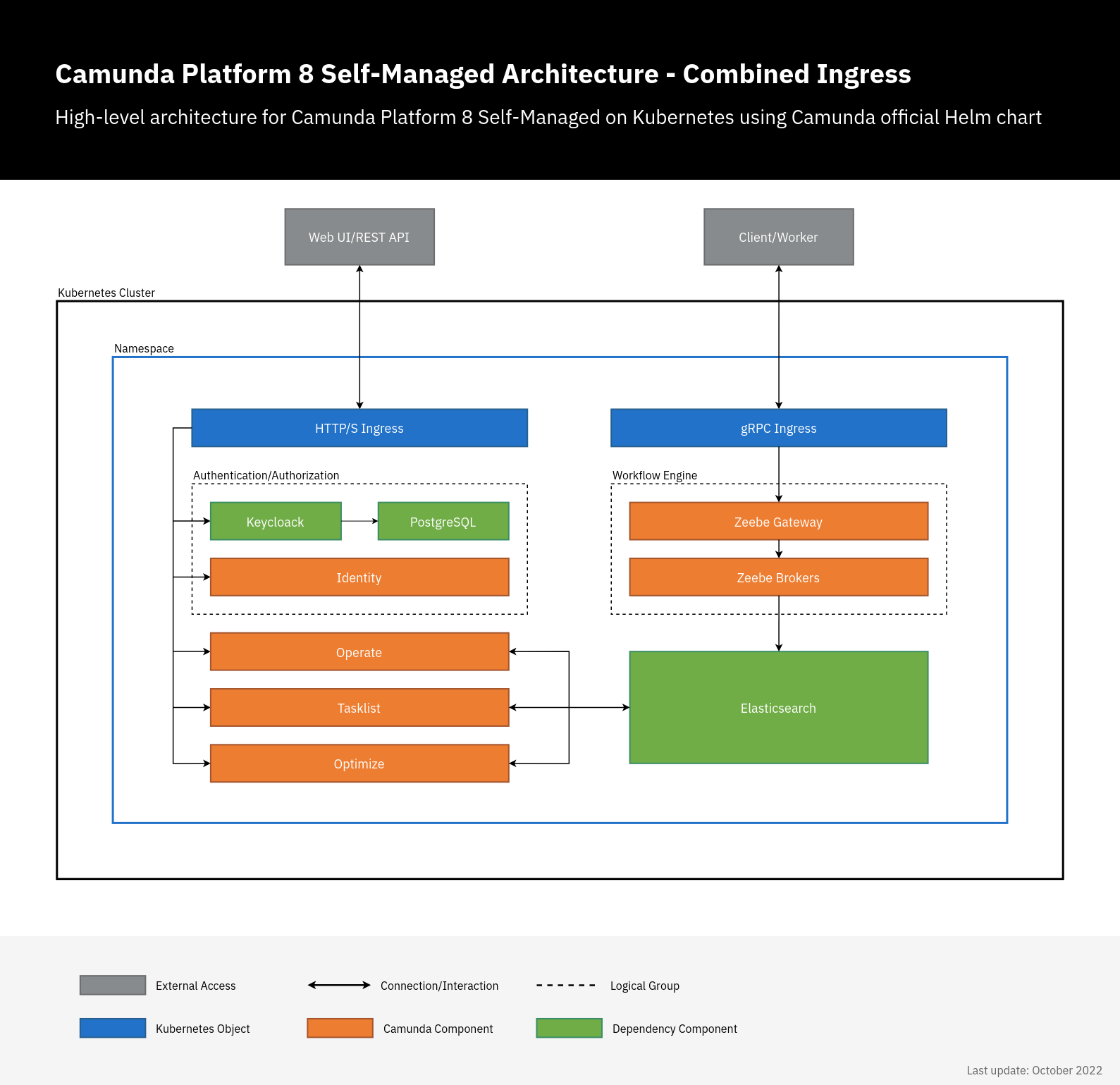
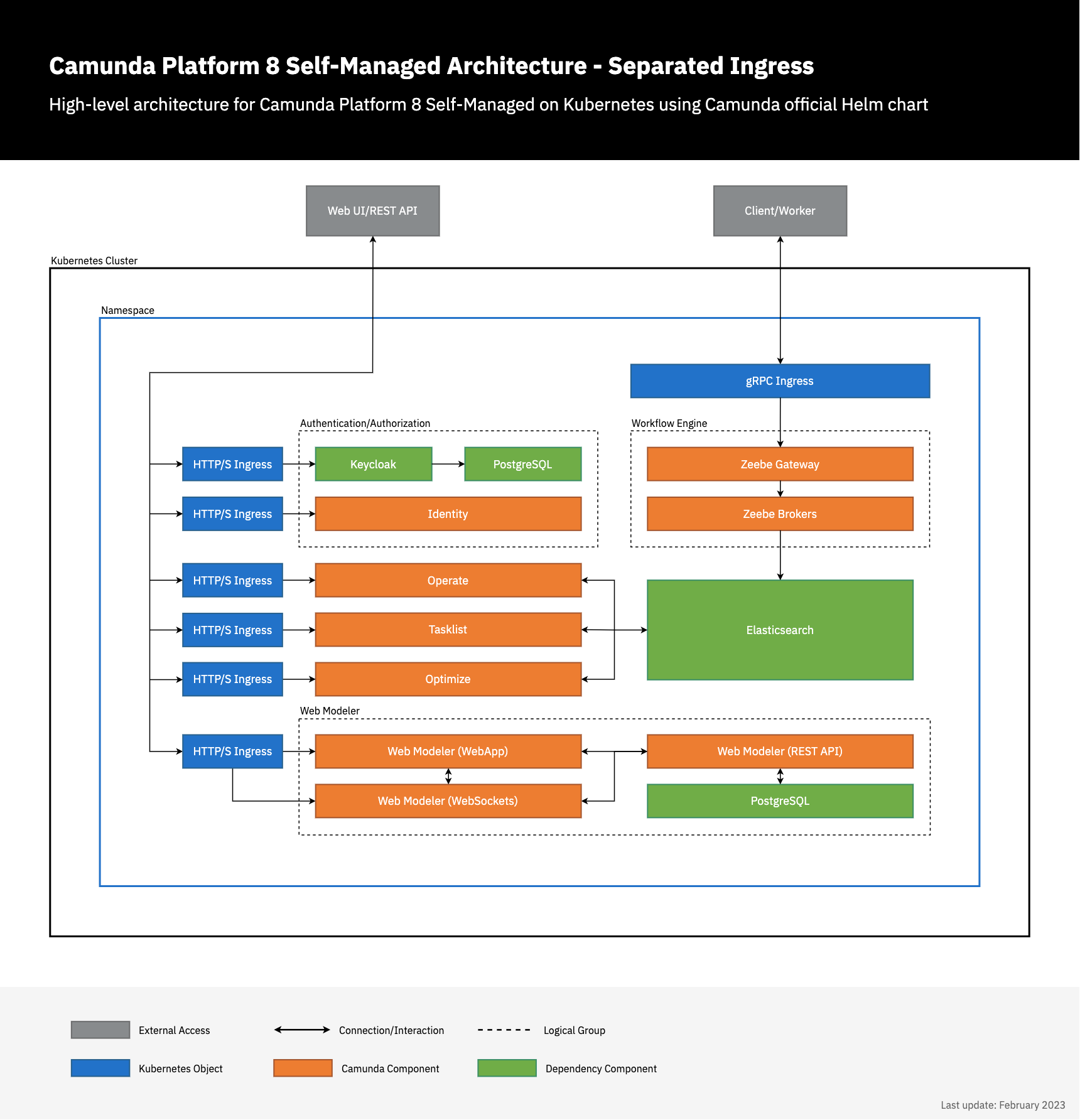
Camunda Platform 8 Self-Managed has multiple web applications and gRPC services. Both can be accessed externally using Ingress. There are two ways to do this:
- Combined setup: In this setup, there are two Ingress objects: one Ingress object for all Camunda Platform 8 web applications using a single domain. Each application has a sub-path e.g.
camunda.example.com/operate, andcamunda.example.com/optimizeand another Ingress which uses gRPC protocol for Zeebe Gateway e.g.zeebe.camunda.example.com. - Separated setup: In this setup, each component has its own Ingress/host e.g.
operate.camunda.example.com,optimize.camunda.example.com,zeebe.camunda.example.com, etc.
There are no significant differences between the two setups. Rather, they both offer flexibility for different workflows.
Camunda Platform 8 Helm chart doesn't manage or deploy Ingress controllers, it only deploys Ingress objects. Hence, this Ingress setup will not work without Ingress controller running in your cluster.
Preparation
- An Ingress controller should be deployed in advance. The examples below use
NginxIngress controller, but any Ingress controller could be used by settingingress.className. - TLS configuration is not handled in the examples because it varies between different workflows. It could be configured directly using
ingress.tlsoptions or via an external tool like Cert-Manager usingingress.annotations. For more details, check available configuration options.
Combined Ingress setup
In this setup, a single Ingress/domain is used to access Camunda Platform 8 web applications, and another for Zeebe Gateway. By default, all web applications use / as a base, so we just need to set the context path, Ingress configuration, and authentication redirect URLs.
The combined Ingress setup does not support Web Modeler yet. To enable external access to Web Modeler, you'll need to set up a separate Ingress.
# Chart values for the Camunda Platform 8 Helm chart in combined Ingress setup.

# This file deliberately contains only the values that differ from the defaults.
# For changes and documentation, use your favorite diff tool to compare it with:
# https://github.com/camunda/camunda-platform-helm/blob/main/charts/camunda-platform

# IMPORTANT: Make sure to change "camunda.example.com" to your domain.

global:
  ingress:
    enabled: true
    className: nginx
    host: "camunda.example.com"
  identity:
    auth:
      publicIssuerUrl: "https://camunda.example.com/auth/realms/camunda-platform"
      operate:
        redirectUrl: "https://camunda.example.com/operate"
      tasklist:
        redirectUrl: "https://camunda.example.com/tasklist"
      optimize:
        redirectUrl: "https://camunda.example.com/optimize"

identity:
  contextPath: "/identity"
  fullURL: "https://camunda.example.com/identity"

operate:
  contextPath: "/operate"

optimize:
  contextPath: "/optimize"

tasklist:
  contextPath: "/tasklist"

zeebe-gateway:
  ingress:
    enabled: true
    className: nginx
    host: "zeebe.camunda.example.com"
Using the custom values file, deploy Camunda Platform 8 as usual:
helm install demo camunda/camunda-platform -f values-combined-ingress.yaml
Once deployed, you can access the Camunda Platform 8 components on:
- Web applications:
https://camunda.example.com/[identity|operate|optimize|tasklist] - Keycloak authentication:
https://camunda.example.com/auth - Zeebe Gateway:
grpc://zeebe.camunda.example.com
Separated Ingress setup
In this setup, each Camunda Platform 8 component has its own Ingress/domain. There is no need to set the context since / is used as a default base. Here, we just need to set the Ingress configuration and authentication redirect URLs.
# Chart values for the Camunda Platform 8 Helm chart in combined Ingress setup.

# This file deliberately contains only the values that differ from the defaults.
# For changes and documentation, use your favorite diff tool to compare it with:
# https://github.com/camunda/camunda-platform-helm/blob/main/charts/camunda-platform

# IMPORTANT: Make sure to change "camunda.example.com" to your domain.

global:
  identity:
    auth:
      publicIssuerUrl: "https://keycloak.camunda.example.com/auth/realms/camunda-platform"
      operate:
        redirectUrl: "https://operate.camunda.example.com"
      tasklist:
        redirectUrl: "https://tasklist.camunda.example.com"
      optimize:
        redirectUrl: "https://optimize.camunda.example.com"
      webModeler:
        redirectUrl: "https://modeler.camunda.example.com"

identity:
  ingress:
    enabled: true
    className: nginx
    host: "identity.camunda.example.com"
  fullURL: "https://identity.camunda.example.com"

  keycloak:
    ingress:
      enabled: true
      ingressClassName: nginx
      hostname: "keycloak.camunda.example.com"

operate:
  ingress:
    enabled: true
    className: nginx
    host: "operate.camunda.example.com"

optimize:
  ingress:
    enabled: true
    className: nginx
    host: "optimize.camunda.example.com"

tasklist:
  ingress:
    enabled: true
    className: nginx
    host: "tasklist.camunda.example.com"

zeebe-gateway:
  ingress:
    enabled: true
    className: nginx
    host: "zeebe.camunda.example.com"

web-modeler:
  ingress:
    enabled: true
    className: nginx
    webapp:
      host: "modeler.camunda.example.com"
    websockets:
      host: "modeler-ws.camunda.example.com"
The configuration above only contains the Ingress-related values under web-modeler. Note the additional installation instructions and configuration hints.
Using the custom values file, deploy Camunda Platform 8 as usual:
helm install demo camunda/camunda-platform -f values-separated-ingress.yaml
Once deployed, you can access the Camunda Platform 8 components on:
- Web applications:
https://[identity|operate|optimize|tasklist|modeler].camunda.example.com - Keycloak authentication:
https://keycloak.camunda.example.com - Zeebe Gateway:
grpc://zeebe.camunda.example.com
Troubleshooting
If something is not working as expected, check the guide for general deployment troubleshooting.